A detailed interior
Swap in your subject and keep the structure.
An editorial photograph of a reading room: walnut shelves, olive velvet armchair, brass lamp, one open book. Late-afternoon light, realistic fabric and wood grain.
Generate intricate scenes and high-fidelity visuals with FLUX.2 [max]. Built for complex compositions, detailed lighting, and refined delivery.
Find a visual direction, then make the prompt your own.
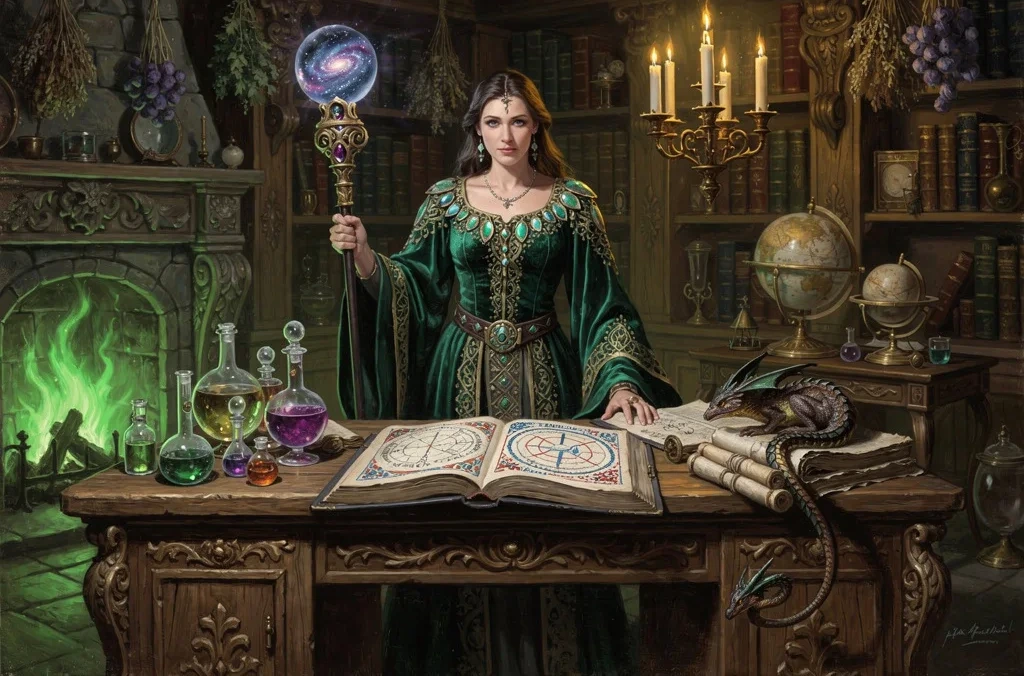
Finished scenes with multiple materials, objects and relationships.
Prompt to try
A lavish, baroque-style image of a powerful sorceress in her arcane study. She is dressed in robes of deep emerald velvet embroidered with gold thread and shimmering beetle wings, holding a staff topped with a glowing, swirling galaxy trapped in a crystal orb.She stands before a massive oak desk covered in open grimoires with illuminated pages showing alchemical diagrams, bubbling potions in glass alembics, and a sleeping pseudodragon curled around a stack of scrolls. The room is filled with curiosities: shelves of leather-bound books, celestial globes, and dried magical herbs hanging from the ceiling. The lighting is chiaroscuro, from a large fireplace with green flames and a magical candelabra floating in mid-air. The brushwork is visible and textured, with rich, deep colors. The style is reminiscent of Rembrandt meets classic fantasy art.
Detail crop of the example image.
Swap in your subject and keep the structure.
An editorial photograph of a reading room: walnut shelves, olive velvet armchair, brass lamp, one open book. Late-afternoon light, realistic fabric and wood grain.
Swap in your subject and keep the structure.
A close product photograph of a clear perfume bottle on black stone with one citrus peel. Precise glass reflections, fine stone texture, soft side light. No words.
If you are still changing the overall idea, return to Pro or Klein. Save Max for a brief you have already refined.
Compare the settings available for your next image.
| Settings | Flux.2 Pro | Flux.2 Max | Flux.2 Flex | Flux.2 Klein | Seedream 5.0 Lite | Seedream 5.0 Pro | Nano Banana 2 | GPT Image 2.5 |
|---|---|---|---|---|---|---|---|---|
| Resolution tiers | Standard | Standard | Standard | Standard | 2K / 3K / 4K | 1K / 2K | 0.5K / 1K / 2K / 4K | Source size when editing |
| Quality levels | Standard | Standard | Standard | Standard | Standard | Standard | Standard | Low / Medium / High |
| Reference images | Up to 4 | Up to 4 | Up to 4 | Up to 4 | Up to 4 | Up to 4 | Up to 4 | Up to 4 |
| Images per generation | 1 | 1 | 1 | 1 | 1 | 1 | 1 | 1 |
| Base credits | 17 credits | 38 credits | 38 credits | 10 credits | 14 credits | 54 credits | 32 credits | 16 credits |
| Base credits by tier | 2K: 14 / 3K: 14 / 4K: 14 | 1K: 27 / 2K: 54 | 0.5K: 24 / 1K: 32 / 2K: 48 / 4K: 63 | Low: 8 / Medium: 16 / High: 32 |
The Generate button shows the cost for your selected settings and references.
Inputs, editing, and credits—before you start.
FLUX here offers aspect ratios and its integration output limits, not the 4K selector available in Nano Banana. Max is a model name, not a resolution.
Generate an image from a written brief, edit one uploaded image, or combine references. Start with a subject, setting, lighting and the details that matter to you.
FluxContext supports up to 4 references for this model. Upload your own JPG, PNG or WebP images, up to 4 MB each.
Available choices: Standard. Choose your framing and add references when you want to guide the result.
Pricing uses fixed tiers for settings and reference images. The Generate button shows the cost of your image.
Yes. Choose Edit on a delivered image to use it as your next input. Describe the change and what should stay the same. Each new generation has its own credit charge.
This model requires sign-in and enough credits. For a free first experiment, use Flux.2 on the main generator.
Not always. Review faces, product details, spelling and composition before using an image. An editing instruction is guidance, not a guarantee that every other pixel remains unchanged.
Describe your idea and start creating.